Aperture vs Wire Thickness: Getting Screening Efficiency Right

A common issue on screen decks is wire that’s too thick for the aperture size. It’s rarely a mistake made on purpose. Thicker wire extends screen life, so it’s an easy, intuitive choice, but it comes at a direct cost to screening efficiency that often outweighs the extra service life it buys.
Screen Products’ guidance on this starts from a simple principle: screening is fundamentally about efficiency, and efficiency is driven by open area. The more apertures a screen surface carries, the more chances material has to pass through on each pass across the deck, and the less time it spends sliding across the surface wearing it down instead of screening.
Why Wire Thickness Drives Open Area
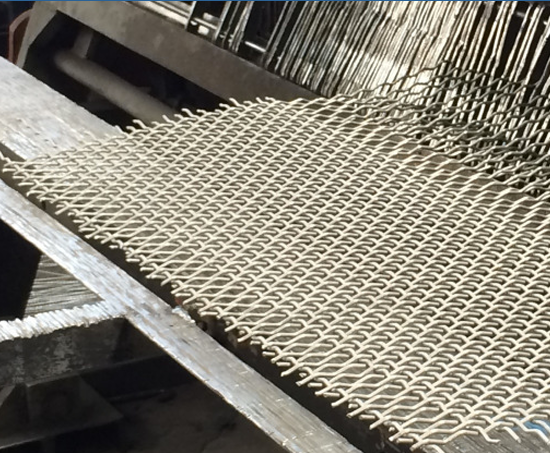
Open area and wire thickness are directly linked: wire takes up width that would otherwise be open area, so a thicker wire than needed means fewer apertures fit, and material takes longer to pass through, wearing the screen from extra sliding contact. Screen life goes up, but throughput and efficiency go down, which is why Screen Products treats the two as separate measures rather than assuming thicker always means better.

Reading the Density Categories
Getting the aperture-to-wire ratio right starts with correctly identifying the density of the material being screened. Screen Products’ recommended ratios are built around four density categories, each covering a different range of materials.
Heavy – covers material from 1,901 to 2,250 kilograms per cubic metre, typically high-abrasive ores.
Medium Heavy – covers 1,601 to 1,900 kilograms per cubic metre, moderate ores.
Medium – covers 1,201 to 1,600 kilograms per cubic metre, moderate abrasives such as limestone and gravel.
Light – covers material up to 1,200 kilograms per cubic metre, coal and other non-abrasive materials.
A Worked Example
At a 25mm aperture, Heavy density needs an 8.0mm wire for 57% open area, Medium Heavy needs 6.0mm for 65%, Medium needs 5.0mm for 66%, and Light needs 4.5mm for 69%.
The aperture stays the same throughout, only density changes, yet open area swings by twelve points. Specifying the Heavy-density wire on a Light-density job would quietly cost that difference for no real durability benefit.
8.0mm
Heavy — 57%
6.0mm
Med. Heavy — 65%
5.0mm
Medium — 66%
4.5mm
Light — 69%
Matching Wire to Feed Size
Feed size matters too. Screen Products’ table gives three feed-size columns per density, since coarser material loads the wire harder than fine material. Staying within the first column keeps the standard wire; moving into the second or third needs the next larger size, and beyond the third, a relief deck is recommended instead.
For the same 25mm aperture, Light density’s columns run 75, 95 and 115mm. An 80mm feed falls into the second column, so the wire size above 4.5mm applies.
75
Col. 1 (mm)
95
Col. 2 (mm)
115
Col. 3 (mm)
Applying the Table in Practice
In practice, specifying a screen correctly means establishing four things before choosing a wire diameter: the aperture required, the density category the material falls into, the feed size reaching the deck, and the tonnage the plant needs to process.
With those four factors established, Screen Products’ aperture-to-wire table gives the correct wire diameter and the resulting open area percentage for that combination directly, rather than defaulting to whichever wire diameter was specified on the previous screen or whichever is already in stock.
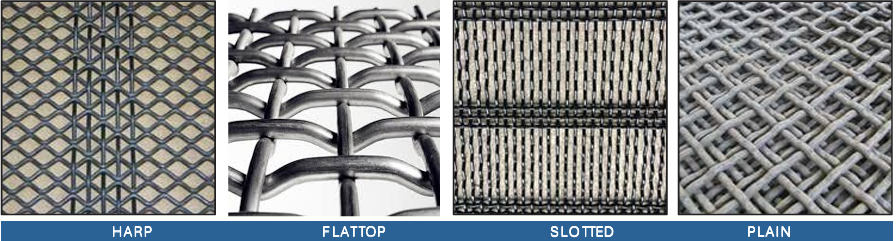
The same table also plays into weave selection. Screen Products supplies eight weave types, and the aperture-to-wire ratio determines which weave is used as standard in most cases, so getting the ratio right has a bearing on weave choice as well as wire diameter alone.

Applying This to Mobile Screening
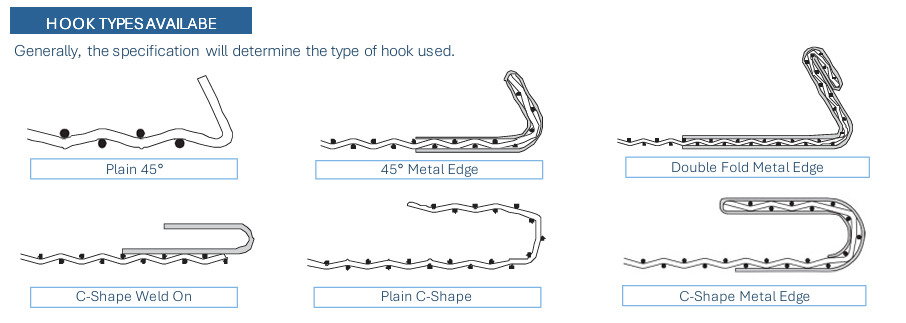
The same aperture-to-wire logic underpins Screen Products’ mobile screening database, which covers screen cloth configuration data across leading mobile screening brands and models. Rather than specifying a generic ex-stock aperture and wire combination, the database matches exact OEM dimensions, hook configurations, and the correct wire diameter and aperture combination for the specific machine.
This confirms accurate fitment, correct tensioning, and compatibility with the unit’s deck angle, stroke and vibration parameters, which keeps the same open-area and screening-efficiency principles covered above intact even when a screen is being specified against a manufacturer’s fitment requirements rather than a plant’s general material and feed-size data.

Getting It Wrong in Either Direction
Too thick
Open area drops, material dwells longer on the deck, throughput falls, and the surface wears from extended sliding contact with material that should have passed through already.
Too thin
The screen fails prematurely under the feed size and tonnage it’s actually handling, costing more in unplanned downtime and replacement screens than the thicker wire would have saved.
Installation and Ongoing Performance
Getting the wire diameter right is only part of keeping a screen deck performing as specified.
STEP 1
Run the new deck empty for 5 minutes.
STEP 2
Stop and re-tighten tensioning bolts.
STEP 3
Keep nosing rubber on camber bars at all times.
Material choice sits alongside wire diameter in a full specification. Screen Products’ guide to screening media materials covers high carbon spring steel versus stainless steel in more depth, for applications where corrosion resistance is the deciding factor.
Signs a Screen Specification Needs Rechecking
A few practical signs point to a wire diameter that no longer matches the application. Falling tonnage through an unchanged feed rate, visible dwell on the deck where material used to clear quickly, and uneven wear concentrated in one area rather than spread across the screen surface are all worth checking against the aperture-to-wire table rather than assuming the screen itself has simply reached the end of its life.
A change in feed material, whether a new ore source, a different crusher setting upstream, or a seasonal shift in moisture or particle size, can also move an application into a different density or feed-size category without anyone deciding to change the screen specification. Rechecking the table against current conditions, rather than the conditions the screen was originally specified for, catches this before it shows up as a throughput problem.